
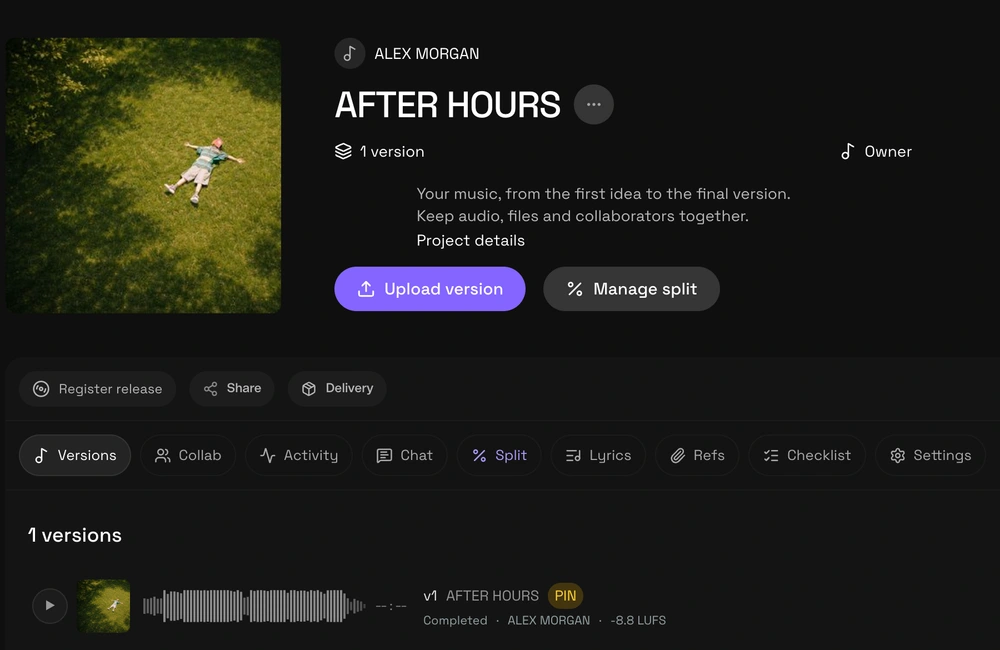
One song, one project
Keep a song’s references, versions, and files together in one project. Before uploading a new mix, agree with the team on which version you’re reviewing and what feedback still needs to be addressed.
wuse brings music projects, versions, and stems together so producers and collaborators can work with the same context.
If you still need to agree on the task and materials, start with a production brief for your collaborator. That list helps you decide what belongs in the project.
Names that avoid confusion
Use a naming convention like titulo_mix_v03_2026-10-06.wav. Increase the version number whenever the audio changes, and keep the earlier versions. Avoid names like final_final: they don’t tell you which file replaces which.
Include a short note with each handoff: what changed, what you need reviewed, and what the next step is. That way, the team can compare versions without piecing the conversation back together.
To check the differences between bounces, learn to compare versions at the same listening position. You can then pinpoint which change needs feedback.
Prepare stems with the recipient in mind
Agree on the format, sample rate, and whether the files should include effects. Export from the same starting point so the stems line up when imported into another session.
Check the exported files before sharing them. Name each file so it identifies the instrument, and make it clear which file is the reference mix and which files are meant for a new mix.
Before exporting, clarify whether the next person expects groups or individual tracks with the guide to stems or multitracks for mixing. Prepare the kind of file they actually need.
Wrap up the handoff with a checklist
Include the reference mix, the agreed stems, the tempo, and any instructions the next person needs. Ask them to confirm they’ve received everything, and avoid changing files in an approved delivery without letting them know.
You can get started in wuse by creating a project and bringing the song’s files together there. Keep your handoff notes alongside the versions to reduce confusion while collaborating.
Once the review is complete, you can record approval of the final audio file. To put this workflow into practice, follow the steps to create your first wuse project.
About Roye
Roye writes wuse’s guides on music production and collaboration. Under the name Dibo Roye, he has public production credits for ALE ALAS and songwriting credits for Tillaz.